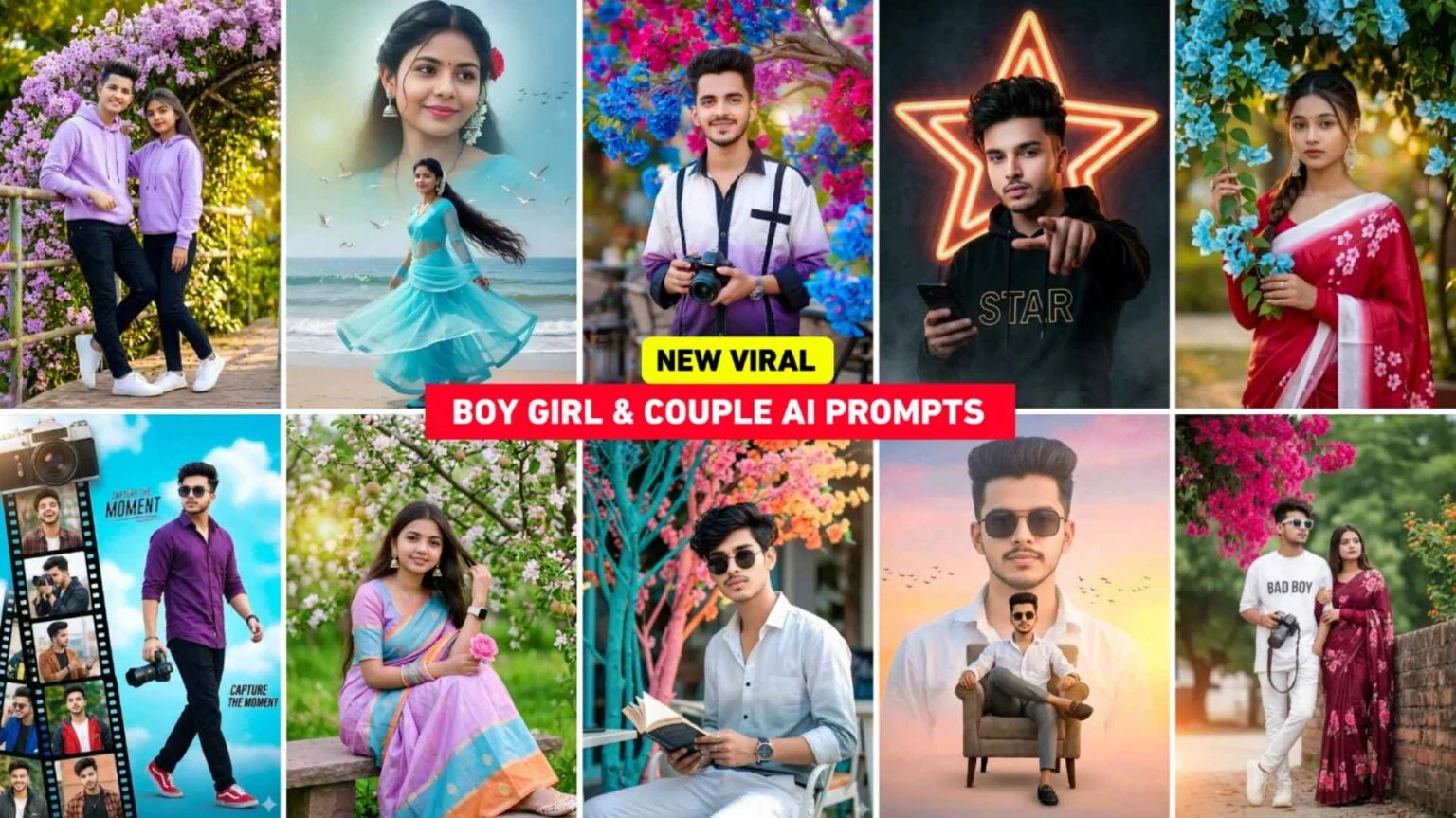
These days, AI photo editing is everywhere. Open Instagram, TikTok, or YouTube, and you will see stylish AI pictures almost every time. Some people are making cool boy edits, some are creating cute girl portraits, and many are trying couple-style AI photos too. Honestly, the trend is growing super fast in 2026.
I have seen that many users now use Google Gemini for photo editing ideas because it gives creative results very quickly. You just explain the type of image you want, and AI helps you create something really nice. Sometimes it looks almost like a DSLR photo. Other times it gives a cinematic vibe. And yeah, sometimes it doesn’t work perfectly, and that’s okay. That’s part of the fun too.
Why People Like AI Photo Editing So Much
The biggest reason is simple — it saves time.
Before AI tools became popular, people spent hours editing photos manually. They used heavy apps, learned difficult settings, and still didn’t always get good results. Now things are much easier.
With Google Gemini and other AI tools, people can create:
- Stylish profile pictures
- Aesthetic Instagram photos
- Romantic couple edits
- Anime-style images
- Cinematic portraits
And the best thing is, you don’t really need editing skills.
Many people try this just for fun at first, but later they start posting the images online because the results look very attractive.
Boy AI Photo Editing Trend in 2026
Boy-style AI edits are getting very popular right now. Most users want a cool and sharp look. You may have noticed photos with:
- Hoodie style
- Street background
- Bike or car themes
- Dark cinematic lighting
- Soft DSLR blur
That type of editing is trending a lot.
I have also noticed that younger users mostly like attitude-style images. They want photos that look clean but powerful at the same time. AI tools can create this vibe pretty easily if the image idea is clear.
Sometimes simple ideas work better than very detailed ones. People often think adding too many things will improve the result, but actually it can confuse the AI.
Girl AI Photo Editing Is Also Everywhere
Girl AI edits are a huge trend too, especially aesthetic styles. Soft colors, glowing skin, cafe backgrounds, flower themes — these styles are everywhere now.
Some users like natural looks, while others prefer fantasy-style images. Google Gemini can help with both types. Many girls use these edited photos for:
- Social media posts
- Story updates
- Display pictures
- Reels thumbnails
One thing I personally noticed is that natural-looking edits usually get more attention than over-edited ones. If the image looks too fake, people scroll quickly. But soft and clean editing feels more real.
And honestly, natural styles also look more beautiful most of the time.
Boy & Girl Ai Photo Prompts

Generate a creative 8K hyper-realistic blue-teal themed fashion portrait. Use the uploaded reference photo with 100% face match. A stylish handsome young man with slightly dark messy hair, wearing a white gradient half-lining shirt and white pants. He holds a book, looks into the camera, and wears round black sunglasses. Capture it as a candid high-key cinematic outdoor café shot with vivid colorful branches framing the background.
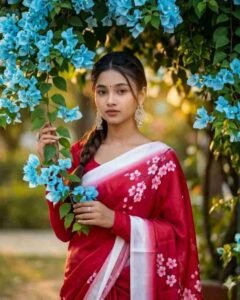
Create an 8K ultra-realistic cinematic portrait of the same woman from the reference photo (face exactly unchanged). She stands outdoors under sky-blue bougainvillea with green branches, holding one branch. She wears a cherry-pink silk saree with a soft white gradient border and cherry-blossom floral prints. Bold makeup, calm closed-mouth expression, and a neat one-side braid with loose flowing hair. Sharp focus, highly detailed.

Generate a couple’s photo featuring a 20-year-old girl and a stylish 21-year-old guy. The guy is leaning against a metal railing, with his other hand resting on the girl’s shoulder, displaying a round smartwatch. High-quality professional photography with a shallow depth of field; the girl is wearing a matching outfit. Attire: Lavender-colored hoodies and black pants, paired with clean, bright-colored sneakers. Lavender Bougainvillea and a garden setting. Both White shoes.
Boy And Couple Prompts

Create an ultra-realistic cinematic full-body portrait of a beautiful Indian girl with her real face and expressions. She wears a blue net anarkali with matching dupatta, blue bangles, juttis, mangalsutra, and a white gajra bun. Bright expressive eyes, glowing makeup, soft smile. Background: dreamy sky gradient with golden sunset clouds and cinematic lighting. Composition: large close-up face above, full body standing on green grass below. Pose: holding fresh paddy stems with flowing dupatta. Add sparkles and warm cinematic glow.

Create a creative poster featuring the same young man (from reference image) walking confidently with an 8K DSLR camera. He wears a stylish purple shirt, red sneakers, and sunglasses against a soft sky-blue background. On the left, add a vertical film-strip collage with multiple candid portraits of him in different outfits and poses, topped with a large vintage camera graphic. Theme: cinematic photography, modern design, soft lighting, vibrant high-contrast look.

Ultra-realistic cinematic full-body portrait of a beautiful Indian girl with her real face and expressions, wearing Blue net anarkali matching dupatta blue churi & juttis, mangalsutra, white gajra in bunBright expressive eyes, glowing makeup soft smile. Backgrounddreamy sky gradient with golden sunset clouds, cinematic light.Compositionlarge close-up face above, full-body on green grass below Poseholding fresh paddy stems, dupatta flowing. Effects sparkles, warm glow cinematic tone

Create a couple photo with both faces 100% identical to the reference. The girl wears a maroon saree with pink floral patterns and a matching long-sleeved blouse. The boy’s outfit stays unchanged. They stand outdoors beside a vibrant bush of bright pink flowers, green foliage, a clear sky, and hints of orange–yellow blooms.
Couple AI Editing Is Becoming Super Popular
Couple AI editing is probably one of the biggest trends right now. Romantic images always attract attention online. Cute poses, rainy backgrounds, sunset vibes — people love this type of content.
Some couples use AI editing for fun memories. Others create matching profile pictures or aesthetic wallpapers.
What makes these edits special is the emotion. Even simple images can look very sweet if the mood feels natural.
Sometimes AI creates weird hands or strange face details though. It still happens in 2026. Many people get frustrated when that happens, but usually trying again fixes the problem.
How People Use Google Gemini for AI Photo Editing
The process is actually very simple.
First, users think about the style they want. Maybe cinematic, romantic, cute, dark, soft, or realistic.
Then they explain the image idea clearly in Gemini. The AI understands the scene and creates the result based on that description.
Many people also upload an existing photo and ask the AI to improve it. For example:
- Better lighting
- DSLR blur
- Sharper details
- Cleaner skin tone
- Aesthetic background
Small changes often make a huge difference.
I have seen that users who keep their ideas simple usually get better results faster.
Things That Make AI Photos Look Better
There are a few simple things that really improve AI-generated images.
Good Lighting
Lighting changes everything. Soft sunlight, golden hour, or warm tones make photos look more attractive.
Clean Background
Busy backgrounds can ruin the image. Simple backgrounds often look more professional.
Natural Expressions
Photos feel better when the expressions look real and relaxed.
Balanced Editing
Too much editing can make the image look fake. A little softness and sharpness is enough most of the time.
Many beginners try very heavy effects at first. Later they realize simple edits actually look cleaner.
Common Problems People Face
AI editing is fun, but yeah, it’s not perfect every time.
Sometimes:
- Faces look different
- Hands look strange
- Background details get messy
- Skin becomes too smooth
This happens with almost every AI tool sometimes. The good thing is you can retry or adjust the image idea again.
Patience helps a lot here.
Why This Trend Will Grow More in 2026
AI tools are becoming smarter every month. Editing that once needed professional software can now happen in seconds.
People also enjoy creating unique images without spending money on expensive editing apps. That’s one big reason this trend keeps growing.
And honestly, social media plays a huge role too. Once people see viral AI edits, they also want to try them.
FAQs
1. Is Google Gemini good for AI photo editing?
Yes, many users use Google Gemini for creative image ideas and stylish AI photo editing concepts.
2. Can beginners use AI photo editing tools?
Of course. Most AI tools are simple, and beginners can use them easily without editing experience.
3. Why do some AI photos look weird?
Sometimes AI makes small mistakes with faces, hands, or backgrounds. Trying again usually improves the result.