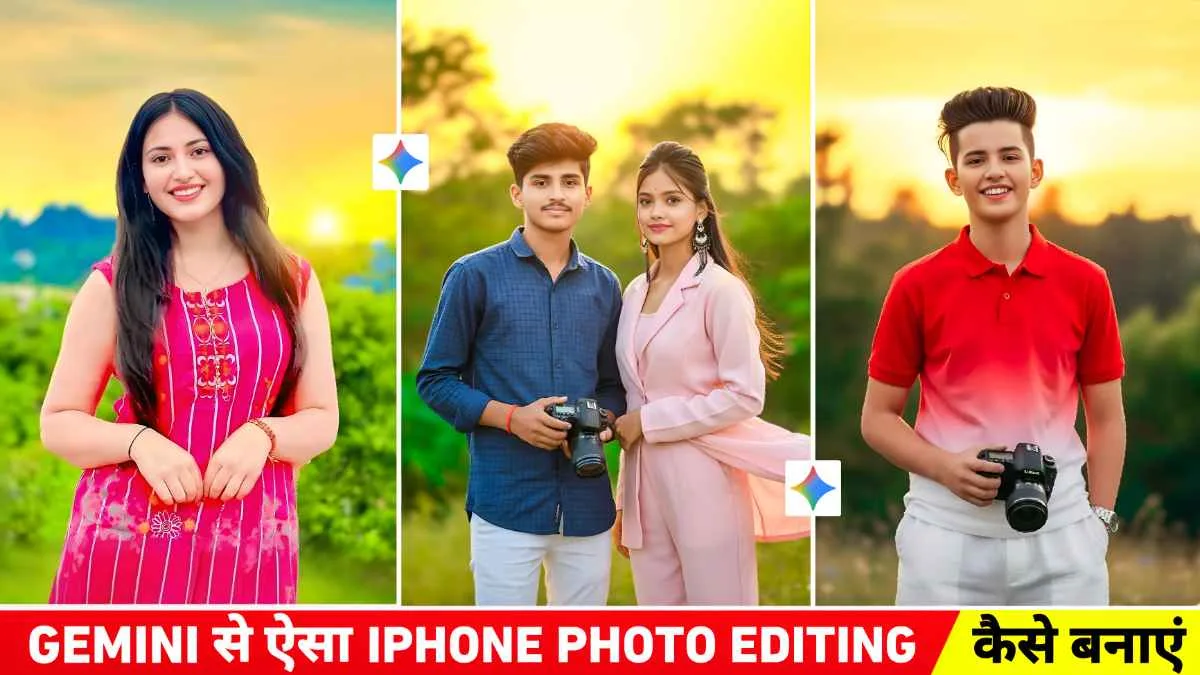
People are editing photos in a totally different way now. A year ago, most AI-edited images still looked fake if you looked closely. Skin looked too smooth, eyes looked strange, and sometimes the face didn’t even match the person. But now with Google Gemini, things are getting kind of scary good. Especially for iPhone-style photo edits.
I have seen that many creators, Instagram users, and even small business owners are using Gemini to make photos look clean and natural without spending hours in editing apps. And honestly, some results look almost exactly like real iPhone camera shots.
The interesting part is not just the quality. It’s the “real face” effect people talk about in 2026. Faces now keep natural skin texture, tiny shadows, normal lighting, and those small details that older AI tools usually ruined.
Many people try this but end up making photos too polished. That’s usually where the image starts looking fake again.
Why People Like Gemini for iPhone-Style Editing
The main reason is realism.
Older AI editors tried too hard. Everything became shiny and perfect. Real photos are not like that. A real iPhone picture has little imperfections. Slight blur in hair. Small skin marks. Uneven lighting sometimes.
Gemini seems better at keeping those things.
Sometimes it doesn’t work perfectly, and that’s okay. But compared to many other tools, the face details stay more human-looking. That’s probably why this trend got huge in 2026.
Another thing people like is speed. You don’t need five editing apps anymore. A lot of users just upload a picture, make a few changes, and done.
Google Gemini iPhone Prompt

Create a photo of a young boy with the same face, hairstyle, and skin tone as the uploaded reference image. He’s wearing a red and white gradient half-line shirt and white loose pants. He’s standing outside during a golden sunset, holding a DSLR camera in one hand, wearing a watch in the other, and a gentle breeze blowing through his hair. The background features trees, natural greenery, and a smooth, blurred iPhone portrait-mode bokeh. Add clean highlights, natural skin texture, warm colors, sharp details, and a premium iPhone look.

Create a photo of a beautiful young woman with long, dark, wavy hair. The face should be similar to the one we uploaded. She is wearing a sleeveless pink and white striped Indian kurti. She is looking at the camera with a genuine smile. The background shows a spectacular sunset with golden yellow and orange skies and lush green hills/leaves in the distance.

Create a hyper-realistic iPhone-style outdoor portrait of a young boy and girl couple using facial features, hairstyles, and skin color similar to the uploaded reference photos. The boy is wearing a blue checkered shirt with bright white pants and is holding a DSLR camera in one hand. The girl is wearing a beautiful, elegant suit that is flowing naturally in the gentle breeze. The two are standing outside during a golden sunset, the sky a bright yellow-orange tone, soft gradient light. Their hair moves slightly in the wind as they look directly into the camera with a soft, natural smile. Surround them with lush trees, natural greenery, and smooth, blurred iPhone portrait-mode bokeh.
What Makes a Photo Look “Real”
This part matters more than people think.
A realistic edit is not about making someone look flawless. It’s more about balance. Good lighting, natural skin, proper shadows, and normal face proportions.
I noticed that over-editing usually ruins the whole thing. Especially with selfies.
Here are a few things that help:
- Keep skin texture natural
- Avoid very bright white teeth
- Don’t sharpen eyes too much
- Leave small face details visible
- Use soft lighting instead of dramatic filters
Funny enough, the small imperfections are what make the image believable.
Best Ways People Use It in 2026
Most users are not doing crazy edits. They’re using Gemini for normal-looking improvements.
Like:
- Fixing lighting in selfies
- Cleaning blurry backgrounds
- Improving portrait quality
- Making indoor photos brighter
- Giving photos that clean iPhone camera feel
Social media creators use it a lot for profile pictures too. Especially TikTok and Instagram users.
I’ve also seen people use it for old family photos. That one is actually pretty cool when done carefully.
Tips for Better Results
One thing people forget is the starting photo matters a lot.
If the original picture is super blurry or dark, AI can only do so much. A decent base image always gives better edits.
A few simple tips:
Use Natural Light
Window light works better than harsh room light most of the time. Even AI edits look cleaner when the original lighting is soft.
Don’t Overdo Face Changes
Tiny adjustments usually look more real than big edits.
Keep Backgrounds Simple
Busy backgrounds can confuse AI tools sometimes. Clean backgrounds make the subject stand out naturally.
Check the Hands and Hair
This still matters in 2026. Faces are much better now, but sometimes hair edges or fingers can still look weird if you don’t notice them early.
Is It Really 100% Real?
Honestly, not always.
Some images still have that “AI feeling” if you zoom in closely. But for normal social media use, most people probably won’t notice.
And to be fair, even regular phone filters already change reality a little bit.
The difference now is that Gemini edits feel softer and more believable. Less plastic. More natural.
That’s probably why people keep talking about the “real face” style this year.
A Small Thing People Ignore
Editing is fine, but keeping photos looking like you matters too.
Sometimes trends push people into making every face look identical. Super smooth skin, same jawline, same eyes. It gets boring after a while.
The best edits are usually the ones where people still look human.
That’s what makes a photo feel real in the first place.
FAQs
1. Is Google Gemini good for realistic face editing?
Yes, many users say it gives more natural-looking face details compared to older AI editors.
2. Can Gemini make photos look like iPhone camera shots?
It can create a similar clean and soft style, especially with portrait photos and good lighting.
3. Does AI photo editing always look fake?
Not always. If edits are small and natural, the result can look very realistic.
Q4: Is it free? Yes, the prompt is completely free to use.