Aesthetic Profile DP Prompt – These days, almost every social media platform, whether it is YouTube, Instagram, Facebook, or Snapchat, gives users the option to add a profile DP. You may have noticed that many people use profile pictures that include their photo, name, or creative design instead of using a simple selfie. Everyone wants their profile picture to look clean, attractive, and professional, especially when it represents their online identity. With the growing popularity of AI editing tools, cinematic colors, creative backgrounds, and aesthetic photo styles have also become popular among social media users. One of the most common trends is creating a stylish Profile DP with a cinematic and aesthetic look. If you also want to turn a simple selfie into an attractive circular profile picture that includes your name and gives your photo a unique appearance, you have come to the right place. In this article, we are sharing useful AI prompts for creating cinematic and aesthetic circular DPs for both boys and girls. These prompts can be used with compatible AI image-generation tools to create creative and eye-catching profile pictures for your social media accounts.
Aesthetic Profile Picture DP Editing
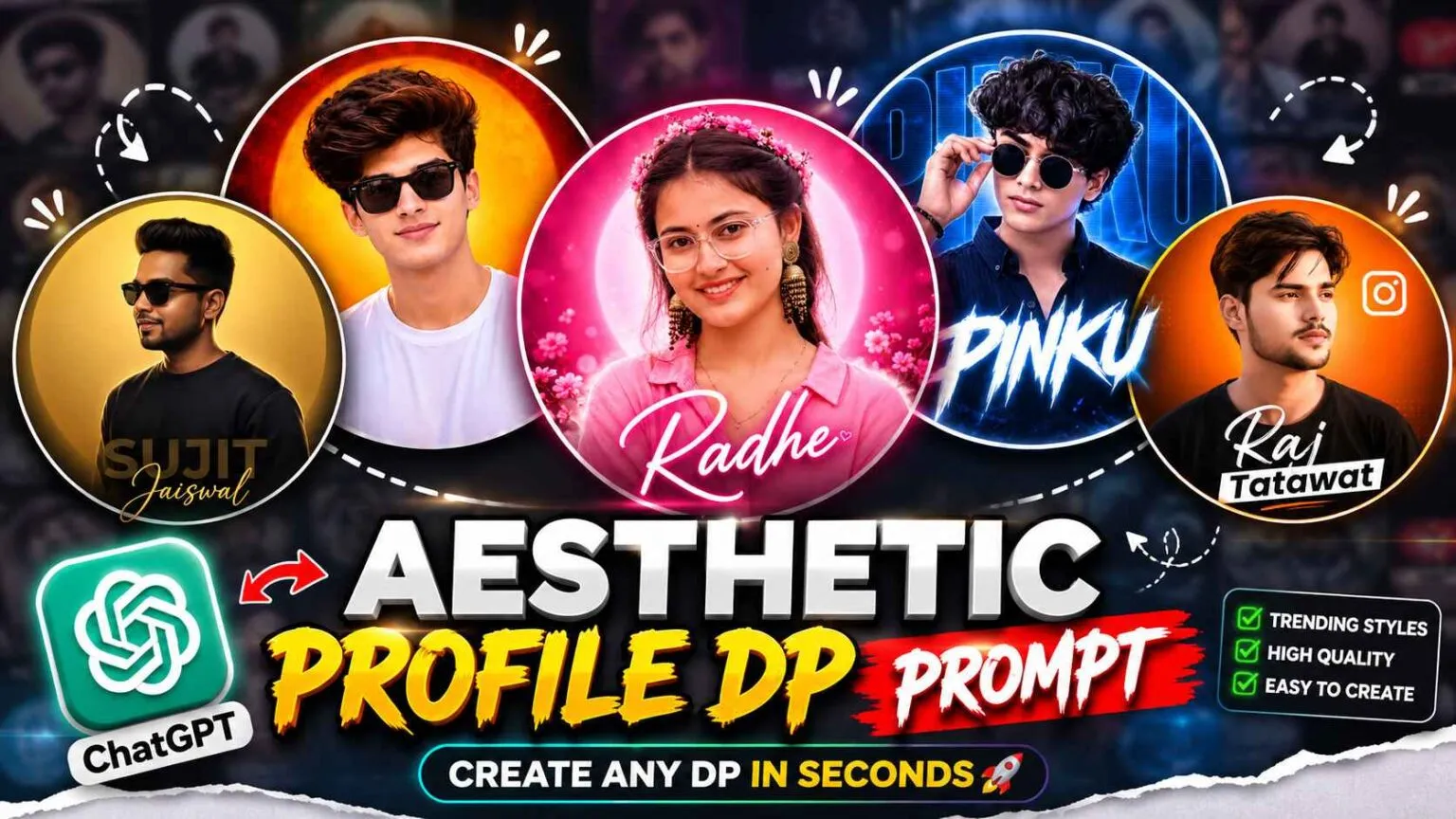
This type of profile DP can easily catch attention because AI tools can create many small details that are usually added while editing a profile picture manually. For example, the image can have a clean circular shape, a thin white border, and a well-balanced composition. The person’s face is placed clearly in the center so it remains visible even when the DP appears in a small size. If you want to create a similar profile picture with an editing app or AI tool, you can use a prompt that describes these details clearly. The final DP can have a round design with your photo and your name placed neatly below it. For the lighting, soft cinematic light can be added to the face to give the picture a polished and professional appearance.
For the boy’s profile DP, the prompt features a glowing dark orange and yellow sun in the background, creating a warm cinematic atmosphere. The boy is wearing a simple white T-shirt along with classic black Wayfarer-style sunglasses. For the girl’s DP, the design shows a smiling girl wearing glasses and a bindi, while her hair is decorated with a beautiful pink flower tiara or headband. Her name is clearly placed below the profile picture in an elegant cursive font.
I have shared several other prompts for creating aesthetic profile DPs as well. You can check the sample images to understand the different styles and then copy or customize the prompt according to your own photo, name, and preferred design.
Aesthetic Profile DP Prompt
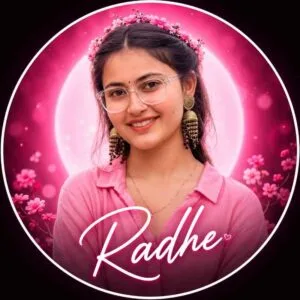
Create a trendy aesthetic circular profile picture using the uploaded girl photo as the exact identity reference. Preserve her face, facial structure, hairstyle and natural appearance exactly. Add transparent fashion glasses, a modern outfit, and a cute pink floral headband. Use a vibrant pink-magenta background with a soft circular glow, subtle bokeh, floral elements and dreamy pink lighting. Add elegant white handwritten text “Radhe” with a subtle pink shadow, fully inside the circle. Make the final DP perfectly circular with a thin white border, no square or rectangular appearance. Premium Instagram aesthetic, realistic face, soft glow, high detail, 1:1 ratio.
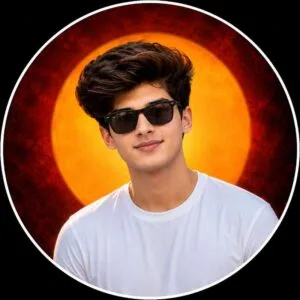
Create a premium aesthetic circular profile picture using the uploaded photo as the exact identity reference. Preserve the boy’s face, facial structure, hairstyle and natural appearance exactly. Add black rectangular sunglasses and a clean white T-shirt. Use a deep dark-red circular background with a warm orange-yellow glowing halo behind his head. Add subtle cinematic lighting, realistic skin texture and sharp details. Keep the entire design perfectly inside a circle with a thin white circular border. No square or rectangular frame. Centered composition, premium social-media aesthetic, realistic photography, 1:1 ratio.
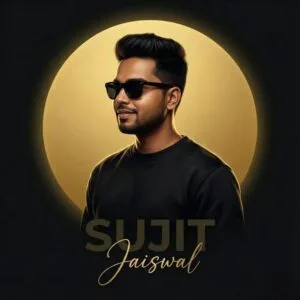
Ultra-realistic cinematic illustrated portrait of the same person from the uploaded face image (100% face & hair match, no change). Hair style exactly same as upload. Side profile (3/4 view), slight smile, wearing black sweatshirt and black sunglass. Dark black matte background with a SOLID FULLY FILLED golden circular disc behind the head (no hollow center, no ring, no outline), smooth gradient gold fill with soft glow. Dramatic cinematic rim lighting from the golden
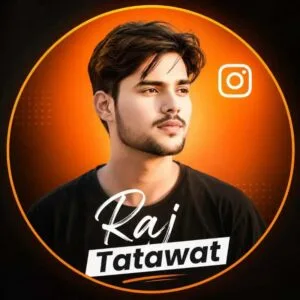
Edit the uploaded portrait into a stylish Instagram profile picture. Keep the person and camera gimbal unchanged. Add a clean orange instagram -themed circular background, place a small Instagram ghost logo in the top-right corner, and add the text ‘YOUR NAME’ in modern white and black typography at the bottom. Use a premium, sharp, social-media DP style with soft glow and high contrast.
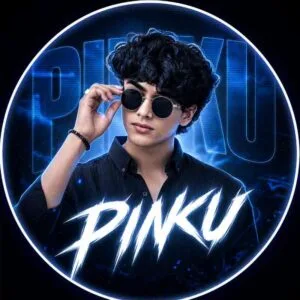
A round profile picture design using the provided image. The image has a strong monochromatic blue and neon white aesthetic. The background features large, translucent block text that says ‘Pinku’ with a horizontal CRT scanline texture overlay. Below, sharp, stylized white text that says ‘Pinku’. High contrast, digital fan art style, flashing neon lighting. Moreover, The face should not be blue at all. In the original skin. Just a slight blue sea effect should be reflected in the light.
DP Created by AI Needs to Be Customized
If you create a profile DP using the prompt shared above along with your own photo, the AI tool can generate a stylish DP for you. However, AI-generated images may sometimes contain small mistakes. For example, your name might not appear correctly, the facial details may look slightly different, or some elements of the design may not match your original request. If this happens, you can simply give the AI another prompt explaining what needs to be corrected. You can also mention the exact changes you want and ask the tool to improve those parts of the generated DP.
If the result still does not look exactly the way you want, you can save the image and open it in your preferred photo editing app. From there, you can make additional changes to the text, colors, background, lighting, or other details. This gives you more control over the final look of your profile picture. If you also want your DP to look sharper and clearer, you can use a suitable photo-enhancement or upscaling tool to improve the image quality before using it as your profile picture.
Create Aesthetic Profile Picture DP Using a Prompt
Creating an aesthetic profile DP with your own photo and a simple prompt is quite easy. Below, I have explained the basic process step by step. By following these instructions, you can create a stylish profile picture using AI tools such as ChatGPT or Gemini.
- Choose an AI tool such as ChatGPT or Gemini.
- Open the app or website and sign in to your account.
- After signing in, select the option to create an image.
- Upload your photo using the media or upload option.
- Copy your preferred prompt and paste it into the chat box.
- Click the Send or Generate button and let the AI create your image.
- Wait a few moments for the profile picture to finish generating.
- Once you are satisfied with the result, save the profile picture to your device.
Final Thoughts
In this article, we explained how you can create an attractive aesthetic profile picture for social media platforms such as Instagram, YouTube, and Facebook. We also covered profile picture ideas with a name as well as simple designs without a name. Using the prompts shared above, you can create a similar style of profile picture with AI tools like ChatGPT or Gemini by adding your own photo. You can also customize the prompt to change the background, lighting, colors, text style, or other details according to your preference. If you are looking for a fresh and creative profile picture for your social media account, give these prompts a try and see which style suits you best.