Cricket fans honestly get excited about everything related to the game. Doesn’t matter where the match is happening, people still want that stadium feeling. The crowd noise, big screen, camera moments… that whole vibe is different.
And one thing always happens in stadiums. The second a cameraman points toward someone in the crowd, that person suddenly starts smiling, waving, jumping, doing random stuff. Because everyone knows the match is live and their face might appear on TV or social media for a few seconds.
Now this exact idea has turned into a viral AI trend on Instagram.
People are making videos where it looks like they’re sitting inside a cricket stadium while the camera keeps focusing only on them. Some edits even show famous players like Virat Kohli or MS Dhoni sitting nearby like real teammates or friends. And honestly, some of these clips look surprisingly real at first glance.
Right now these videos are spreading very fast online. Many creators call this trend “Cricket Stadium AI Video Editing” or sometimes “Broadcast AI Reels.”
So if you were wondering how people are making these edits, this guide is basically about that.
How These Cricket Stadium AI Videos Actually Work
The process is pretty simple once you understand it.
First, AI creates a realistic image using your face. After that, the image gets converted into a moving video clip where you appear inside a crowded cricket stadium. The final result makes it feel like the stadium cameraman is fully focused on you while the commentary is happening in the background.
Some videos even add dramatic crowd reactions. That makes the edit look more fun.
To create these kinds of reels, most people first generate a good photo using tools like Google Gemini or ChatGPT. Usually, a prompt is used to describe the scene properly. After the image is ready, creators move to AI video tools like Flow AI to animate the photo and turn it into a realistic stadium clip.
So yeah, there are mainly two prompts involved in the full process.
One prompt helps create the image.
The second one turns that image into a video.
You can also customize the scene however you want. Some people add team jerseys, favorite players, crowd celebrations, or special match moments into the image prompt itself. Small details actually make the video look much better.
And once everything is generated, the result looks almost like a real broadcast moment from a live cricket match. That’s probably why this trend is blowing up so quickly on Instagram reels these days.
Make Cricket Stadium AI Photos With Gemini Prompts
Creating these cricket stadium AI photos is actually pretty simple once you understand the process. You just need a good prompt and a clear selfie. That’s the main thing. A blurry or dark photo usually gives weird results, so try using a clean picture where your face is visible properly.
A lot of people try different AI tools for this trend, but honestly, Google Gemini gives much better face matching in most cases. The final image looks more natural and closer to your real face, which is why many creators are using it for these viral cricket edits.
So first, open Gemini from the website or app. If you like using apps more, you can install the Gemini app directly from the Google Play Store. After logging in with your Gmail account, look for the image creation option.
Now upload your selfie in the media section and paste the photo prompt there. That’s it. Then hit the send button and wait a few seconds.
Usually, the AI creates the image pretty fast.
Sometimes the first result looks amazing. Sometimes it doesn’t. That’s normal, honestly. If the face looks odd or the stadium background feels messy, just generate it again with the same prompt or make small changes. Most people retry 2–3 times before getting the perfect image.
And yeah, your reference photo matters a lot here. A bright selfie with a proper face angle works much better than random cropped photos.
Once Gemini generates the image, open it fully and check the details closely. If everything looks good, save it directly to your device. After that, you can use the same image later for creating cricket stadium AI videos and reels.
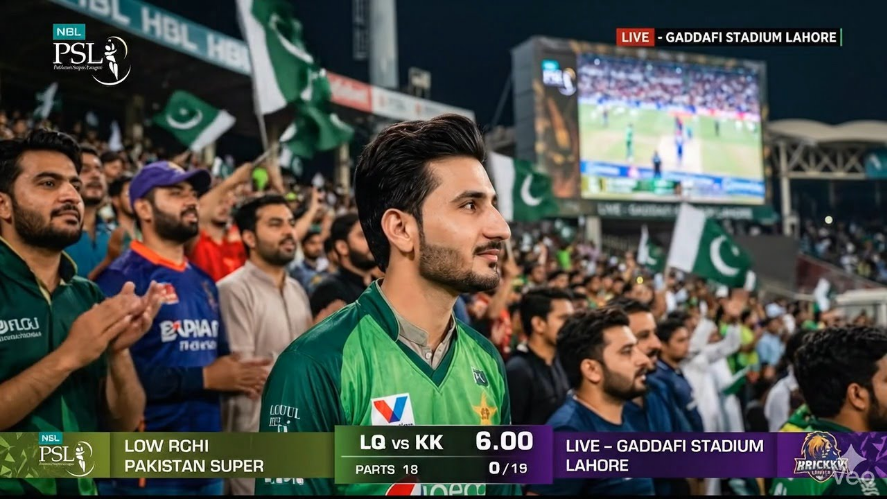
Realistic sports broadcast screenshot-style documentary photo taken in the spectator stands of a high-energy PSL match in Pakistan, 16:9 ratio. The person from the uploaded image is sitting among passionate Pakistani fans, looking toward the field with an intense focused expression and a slight smile. Natural Pakistani features, soft glowing skin, realistic facial details, straight posture, wearing an authentic PSL team jersey. Crowded stadium background filled with cheering supporters, dramatic floodlights, cinematic sports lighting, candid fan moment, ultra realistic photography, slightly zoomed-out framing, live broadcast atmosphere, depth of field, professional zoom lens feel.
How To Make Cricket Stadium AI Video With Flow AI
If you want that realistic cricket stadium video effect, then honestly, Flow AI is giving the best results right now. A lot of AI video tools are available online, and yes, some of them work fine too. But when it comes to stadium-style videos where the camera focuses on you like a live broadcast, Flow AI looks much more natural.
That’s why most creators are using it for these trending Instagram reels.
The process is not very hard either. First, you’ll need a good AI-generated photo. Most people create it using Google Gemini or ChatGPT with a proper prompt. After that, the image is uploaded into Flow AI to turn it into a moving video.
And the cool thing is, the final clip actually feels like a real sports broadcast sometimes. The camera angle, crowd background, and zoom effect — all of it makes the video look pretty convincing.
I’ll explain the full method step by step, including how to use prompts inside Flow AI with the image you created earlier. So even if you’re trying this for the first time, you probably won’t have much trouble making your own cricket stadium AI reel.
Realistic live sports broadcast celebrity-cam moment in a packed PSL stadium (Gaddafi Stadium Lahore), 16:9 ratio. The person from the reference image is sitting naturally in the energetic crowd wearing a Lahore Qalandars jersey. After noticing the camera, they give a soft natural smile and casually raise one hand for a small “hi” gesture with desi swag. No overacting or exaggerated reaction, just a calm, cool, candid moment. Preserve exact facial identity, hairstyle, skin tone, and outfit from the reference image. Vibrant Pakistani crowd atmosphere with green flags, loud chants, and passionate fans, cinematic stadium floodlights, shallow depth of field, telephoto sports lens look, ultra realistic live TV broadcast style like a PSL match on PTV Sports or A Sports
Final Words About Cricket Stadium AI Videos
Right now these cricket stadium AI videos are everywhere. Open Instagram or YouTube for a few minutes and you’ll probably see someone sitting in a packed stadium while the camera keeps zooming on them like they’re part of a live match broadcast. People are loving this trend because honestly, it looks pretty real.
So in this guide, we talked about the full process in a simple way. From creating the photo first to turning it into a proper AI video, everything was explained step by step. We also shared two different Cricket Stadium AI prompts — one for the image and another for the video part.
And the good thing is, you don’t really need heavy editing skills for this type of content. Once you understand how the prompts work inside the AI tools, making these videos becomes much easier than most people think.
Try your own style with it too. Add your favorite team, player, jersey, crowd reaction… little things like that make the final video feel more fun and personal.