These days almost everyone is trying AI photo editing. Open Instagram, TikTok, or even WhatsApp status, and you’ll see those stylish couple edits, bike poses, rainy photos, hoodie looks, and cinematic AI pictures everywhere. A lot of people are now using Google Gemini for creating photo ideas and editing concepts because it feels simple compared to many other AI tools.
I have seen that younger users especially love the “real face” style. They don’t want cartoon-looking images anymore. They want edits that actually look close to real life. Like natural skin, realistic hair, proper shadows, and normal expressions. Honestly, that’s what makes these edits look cool.
The big trend in 2026 is boy-girl and couple editing prompts. Friends use them for reels, profile photos, thumbnails, and even birthday posts. Some couples use AI edits instead of doing expensive photoshoots. Sounds funny maybe, but it actually saves money.
One thing many people don’t realize is that prompts matter a lot. Even a small wording change can totally change the final image. Sometimes it gives amazing results, and sometimes the face looks weird. That happens to almost everybody.
Why People Like Gemini for Photo Editing
A simple reason — it’s fast.
You type an idea, upload a photo if needed, and Gemini gives creative suggestions or image concepts quickly. Many users also mix Gemini with other editing apps for better results.
I noticed that people mostly use it for:
- Couple pose ideas
- Stylish hoodie edits
- Rain effect photos
- Royal look edits
- Bike and car backgrounds
- Korean-style portraits
- DSLR effect images
- Soft aesthetic lighting
And yeah, “real face” edits are getting more attention now because older AI styles looked too fake.
Google Gemini Boy Girl & Couple Photo Editing Prompts

Create an 8K ultra-realistic photo of an Asian man, with the face and hairstyle preserved from the reference image. He is sitting casually on a park bench surrounded by a vibrant Bombax Ceiba flower tree garden. He is wearing a bold red and black shirt, tailored black fit pants, white sneakers, and a black smartwatch. The mood is relaxed and outdoors, with natural daylight and trees in the background.
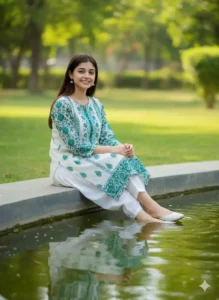
A beautiful young South Asian woman is sitting by the edge of a calm, clear pond or stream with her feet dipping into the water. She is wearing a traditional white and teal or emerald green Salwar Kameez or Kurti set with an intricate block print or floral or paisley pattern. She has a warm, genuine smile and medium-length dark hair. The setting is a lush green park or garden with soft, natural daylight and a shallow depth of field (bokeh) to blur the background trees and grass. Candid, realistic photography. Keep the face exactly the same as the reference image.
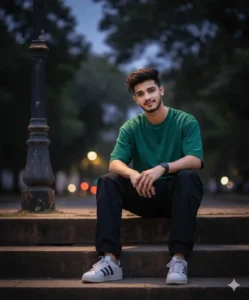
Cinematic hyper-realistic shot of a 21-year-old man sitting on stone stairs beside an old lamp post at twilight. He has a soft smile, with his arms resting on his knees. Outfit: green heavyweight oversized t-shirt, black cargo pants, white Adidas sneakers, Apple Watch, and slightly messy dark hair. Background: glowing streetlight, blurred trees, creamy bokeh, 8K. Keep face exact same as reference image.
Gemini Viral Photo Prompts
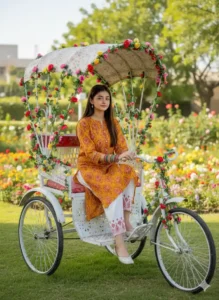
A vibrant portrait of a 28-year-old girl wearing a mustard yellow kurta with red and white print. She also wears white printed tulip pants and sits in a full vintage white metal rickshaw prop, fully visible from front to back. The rickshaw has small flowers and vines, creating a colorful and lively feel, creating a charming and lively scene. The setting is a lush, green outdoor garden during the day. She has long, dark hair, is smiling, and is wearing bangles and embroidered flat shoes. Slim body. Don’t change face. Keep face 100% same as reference image.
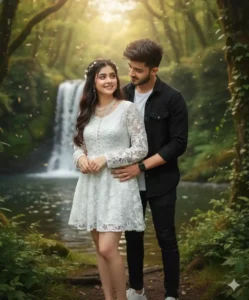
A young couple, with the man holding both hands on the woman’s waist. The woman is wearing a wet, dark, form-fitting dress with intricate lacing and beading. She is facing the camera with her head tilted back, eyes closed, as if in ecstasy or surrender. A waterfall or flowing water is in the soft-focus background. Her hair is wet and flows down her back, and she wears a beaded necklace. The lighting is soft, highlighting the wet texture of her mini dress and skin. The boyfriend is wearing a white t-shirt, black shirt, and pants. Keep face exact same as reference image
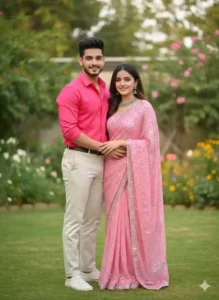
Face unchanged from the uploaded image, create a photo of a young man and a young woman posing together. They are coordinating their outfits with a pink color theme. Man’s attire: He is wearing a bright, solid pink long-sleeved dress shirt with the top button undone. The sleeves are rolled down, and he pairs it with white or off-white trousers or jeans. Woman’s attire: She is wearing a traditional pink saree adorned with silver or light pink sequins and embellishments scattered across the fabric.
Gemini Viral Photo Prompts
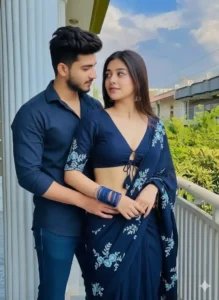
Portrait of a confident Indian couple, use the reference photo above, posing in a romantic mood, wearing deep dark navy blue. Jeans top adorned with delicate light blue flowers on the fabric, styled in a modern drape with a matching blouse that ties at the front. Her outfit highlights her toned and elegant curves, revealing her full belly, navel, and chest. She wears bold blue bangles and a silver nose ring, match in reference. A dark navy blue shirt and jeans girl’s dress saree. Keep face exact same as reference image.
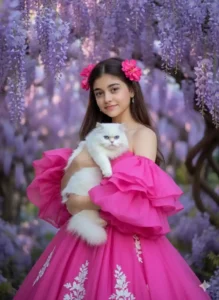
A hyper ultra realistic 8K portrait of a real photo, showing a young girl (face matching 100% model face) with long dark hair, adorned with bright pink flowers, while she looks at the camera gently. She is also wearing a vibrant off-the-shoulder fuchsia pink gown with ruffled sleeves and delicate white floral embroidery on the skirt. In her arms, she cradles a fluffy white cat with piercing blue eyes, which meanwhile looks towards the viewer. The setting is magical, with cascading purple wisteria flowers hanging from above.
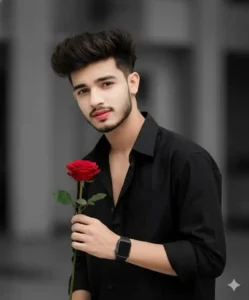
Without changing my facial features, create a stylish and modern portrait of a young man named Noor, with voluminous dark hair and pink lips, wearing a loose-fitting black shirt. He is holding a single red rose, accessorized with a watch and a small earring. The background is soft, minimal, and subtly blurred to emphasize a contemporary, fashion-forward vibe. The lighting should be cinematic, with ultra-detailed, realistic textures and a polished editorial aesthetic. Keep face exact same as reference image

A stylish young man with messy hair and attitude, wearing a white and yellow shirt, an anklet, dark black joggers, and white Nike sneakers. He sports rimless yellow sunglasses and a smart watch. He is sitting casually outdoors on a low wall with one leg bent, looking to the side confidently. Background: lush greenery, urban vibe, cinematic lighting, ultra-realistic 8K DSLR image. Keep face exact same as reference image.
How People Usually Use These Prompts
Most users don’t just copy one prompt and finish the work. They test different styles again and again.
A normal process looks something like this:
- Choose a clear selfie or couple photo
- Open Gemini or another AI editing tool
- Add a creative editing prompt
- Adjust style, lighting, background, and clothes
- Save the best version
- Sometimes edit again in apps like Snapseed or PicsArt
Pretty simple honestly.
Many people try this but they expect perfect results in one click. That usually doesn’t happen. AI still makes mistakes sometimes. Hands may look odd. Hair can get messy. Background text becomes blurry. But after 2 or 3 tries, the image usually gets much better.
Real Face Editing Feels More Natural
The reason people search “real face prompts” so much now is because they want realistic photos instead of overly smooth AI skin.
A good realistic edit normally has:
- Natural lighting
- Clean skin texture
- Real-looking eyes
- Balanced colors
- Soft shadows
- Proper face shape
Too much editing actually ruins the image. I’ve seen people add crazy glow effects and heavy blur. It removes the real feeling completely.
Sometimes simple edits look better than ultra-edited ones.
Couple Edits Are Everywhere Right Now
Couple AI edits became super popular because of social media trends. You’ve probably seen those matching outfit edits or romantic rainy scenes online already.
Some common themes people love:
- Sunset walking scenes
- Black hoodie couple edits
- Cafe style photos
- Royal king-queen looks
- Holding hands cinematic shots
- Cute mirror selfies
- Travel-style backgrounds
These edits are mostly used for reels and profile pictures. And honestly, some of them look surprisingly professional.
How to Use These Prompts in Google Gemini
- Open the Gemini app or website.
- Upload your photo.
- Paste any prompt above.
- Hit send and watch the magic happen!
Tips for Better AI Photo Results
Here are a few simple things that actually help:
Use Clear Photos
Blurred selfies confuse AI tools. A decent clear image works much better.
Don’t Overwrite the Prompt
People add too many details sometimes. Short and clear instructions often give cleaner results.
Try Different Moods
If one style looks boring, try changing lighting or background vibes. Small changes help a lot.
Keep Expectations Normal
AI editing is fun, but not magic. Sometimes the result is amazing. Sometimes it looks completely random.
And that’s okay honestly.
Is This Trend Going Away?
Probably not soon.
AI photo editing is becoming normal now. Even small creators and students are using it daily. The tools are getting smarter every few months too. Realistic editing especially is improving fast in 2026.
I think the main reason people enjoy it is because it feels creative without needing heavy editing skills. You don’t need to learn Photoshop for years anymore just to make a stylish image.
You just need a decent idea and some patience.
FAQs
1. What are Google Gemini photo editing prompts?
They are text instructions people use to create or improve AI-edited photos using Gemini and similar tools.
2. Why do people search for “real face” prompts?
Because realistic edits look more natural and closer to real photography instead of fake AI art.
3. Can beginners use Gemini for photo editing?
Yes, definitely. Most people start without any editing experience. It’s pretty beginner-friendly.
Conclusion
These 100+ Google Gemini boy girl couple photo editing prompts for real face 2026 are a game-changer. They save time, look natural, and work for beginners and pros. Start using them today and give your photos a fresh, realistic upgrade!
FAQs
What are Google Gemini boy girl couple photo editing prompts? They are easy text commands that tell Gemini AI exactly how to edit photos of boys, girls, or couples with a natural real face look.
Are these prompts updated for 2026? Yes! They include the newest Gemini features for better realism and high-quality results.
Do I need to pay to use them? Most prompts work with the free version of Google Gemini. Advanced options may need Gemini Advanced.
How can I get the best real face results? Use clear prompts that mention skin, eyes, lighting, and “real face” or “natural look” for perfect edits every time.