These days, AI photo editing is everywhere. Open Instagram or TikTok and you’ll see stylish bike photos with cool backgrounds, sharp lighting, and realistic faces. A lot of people are now using Google Gemini AI for this trend, especially bike lovers who want cinematic photos without doing heavy editing.
Honestly, the results can look really amazing when done properly. I have seen that many users create photos that almost look like DSLR shots. And the best part is, the face still looks real and natural instead of fake or cartoon-like.
Many people try this but sometimes they expect perfect results in one click. That usually doesn’t happen. You need a little patience and the right editing style. But once you understand how it works, it becomes much easier.
What Is Google Gemini AI Bike Photo Editing?
It’s basically a new AI editing trend where people use AI tools with bike photos to create stylish and realistic edits. The AI improves the photo quality, adds cinematic effects, changes backgrounds, improves lighting, and keeps the face looking natural.
That “real face 100%” part is what most people want now. Nobody likes overly fake AI faces anymore. People want edits that still look like them.
Usually, these edits include:
- Sports bikes or superbikes
- Moody backgrounds
- Rain effects
- Cinematic colors
- DSLR-style blur
- Street or highway looks
Sometimes the edits look so real that people think they were clicked using an expensive camera.
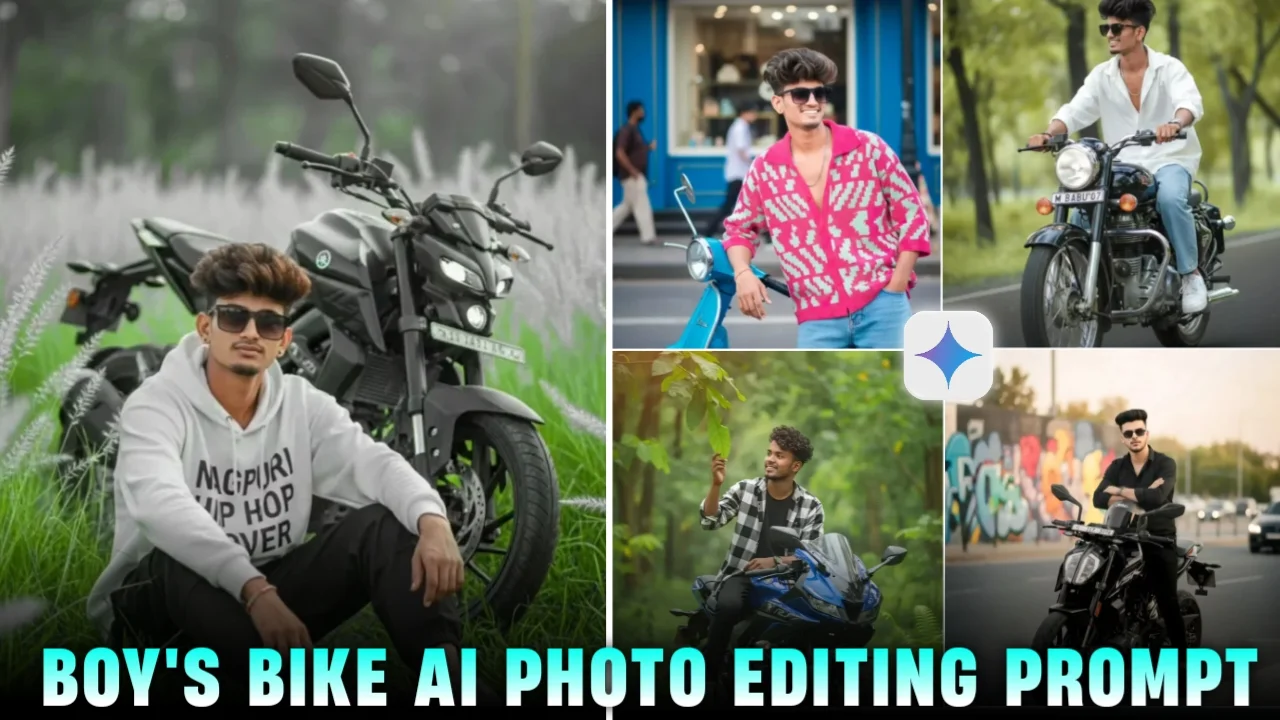
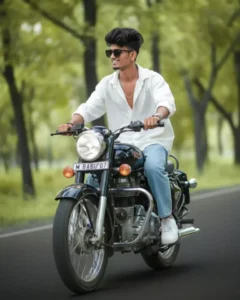
A slim-fit 5’9 young man riding his black Royal Enfield Bullet 350, glancing confidently to the side, hands on the handlebars, leaning naturally into the ride. He’s wearing an Oversized white linen shirt with the top buttons open, light blue baggy jeans, and clean white Nike Air Force 1 sneakers. A silver wristwatch shines subtly on his wrist, and narrow-frame rectangular classy sunglasses complete his look. His face is fully visible preserve 100% face. Number plate editingprompt
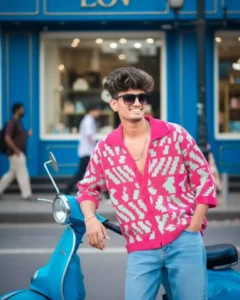
Indian young man (followed by given picture face is 100% unchanged) with wavy, hair style volume, wearing a loose-fitting, vibrant knit shirt with pink and mint green patterns and rolled-up sleeves.
The shirt is unbuttoned at the chest, paired with relaxed blue jeans. He poses stylishly leaning against a bright blue Vespa Scooter, one hand on the handle, sitting casually in an urban street Scene with a blue shop exterior and large windows in background daylight lively street ambiance
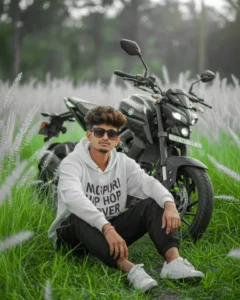
Ultra Realistic 4k cinematic portrait of handsome young boy. seated in a long height lush green field, wearing white color oversized printed hoodie loose black colour cargo pant. and puma vwhite shoes, and relaxed, he gazes thoughtfully into the distance, give a instagram poss .he looking on camera with cutness His face and hair match the reference image 100%. Soft white feathery grass and blurred trees create a shallow depth of field. The boy is looking at the camera. And a mt15 4 in
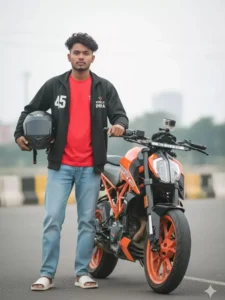
Hyper-realistic full body shot: me A 16 year old cool young boy black khelo india tracksuit prent (45) jacket red tshit, sky blue baggy Jean’s, and withe sliper, and slightly messy dark hair, sharp jawline, direct gaze, his height, he sitting on a customnized orange and orange ktm Duke 160 motorcycle, He is looking in camera, He has of the bike and he has placed his hands on it, The scene is Outdoors keep my face same 100% same as in the reference.gopro set kr do.remove mirror.bike sidha hona chahiye.aur bike ke side me khada hu hand me helmet hai, mera hight 4,5″ fit
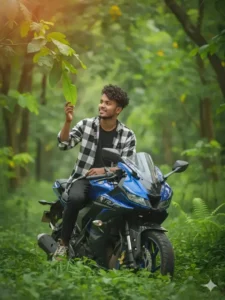
100% my face same to same and high quality regulations A stylish young man in image) is sitting on a Yamaha R15 bike in a lush, sun-drenched forest.He a black checked shit. The young man is smiling naturally while gently touching a green leaf from a nearby branch.
The background is softly blurred with green trees, foliage, and sunlight creating a warm, golden-hour glow with subtle lens flare. The foreground has vibrant green ferns, giving the Scene a serene and cinematic atmosphere
Why This Trend Is Growing Fast
One simple reason — it looks cool.
Bike lovers already enjoy taking photos with their bikes. AI just makes those photos more stylish and eye-catching. Also, not everyone knows professional editing. AI tools save a lot of time.
I have noticed that younger users especially love these edits for:
- Instagram posts
- WhatsApp DP
- Reels thumbnails
- Facebook profile photos
And honestly, some edits look better than manual editing apps.
How People Use Google Gemini AI for Bike Edits
The process is actually pretty simple. You upload a normal photo, describe the style you want, and AI helps create the final look.
Here’s how most people do it:
Choose a Good Photo
This part matters a lot. A clean photo with decent lighting gives better results. If the image is blurry already, AI can only fix it to some extent.
Try to use:
- Clear face photo
- Visible bike
- Outdoor lighting
- Natural pose
Many people take random dark photos and then wonder why the AI result looks strange.
Describe the Style Properly
This is where the magic happens.
People usually ask for:
- Cinematic look
- Rain effect
- Neon lights
- Road background
- Sunset vibe
- DSLR blur
The AI understands these styles and applies them to the image.
Sometimes it doesn’t work perfectly, and that’s okay. Just changing a few words or trying again can improve the result a lot.
Keep the Face Natural
This is the most important thing right now.
Earlier AI edits used to completely change the face. Now people prefer realistic edits where the face still looks original.
A natural skin tone, correct eyes, and realistic expressions make the image much better. Over-editing usually ruins the photo.
I personally think softer edits look cleaner than extremely sharp or fake-looking edits.
Things That Make Bike AI Photos Look Better
There are a few small things that really improve the final result.
Background Matters
Roads, mountains, rainy streets, parking areas — these backgrounds usually look great with bikes.
Simple backgrounds work too, but cinematic places give stronger results.
Lighting Changes Everything
Good lighting can make an average photo look expensive.
Golden hour sunlight, night lights, or soft shadows give a much better vibe. Harsh lighting sometimes makes the face look weird in AI edits.
Outfit Also Helps
You don’t need expensive clothes honestly. But jackets, helmets, hoodies, or black outfits usually match bike edits really well.
Many creators also use gloves or sunglasses for a more stylish look.
Common Problems People Face
A lot of beginners get frustrated quickly.
Some common issues are:
- Face becomes too fake
- Bike shape changes
- Hands look weird
- Background feels unrealistic
This happens because AI still isn’t perfect. Even the best tools make mistakes sometimes.
I have seen that simple photos usually work better than overly complicated ones.
Are These AI Edits Good for Social Media?
Definitely yes.
That’s actually one of the biggest reasons this trend exploded. These edits grab attention fast. People stop scrolling when they see a clean cinematic bike photo.
For creators, this style helps a lot with:
- Better engagement
- More profile visits
- Attractive thumbnails
- Stylish personal branding
But at the same time, keeping edits natural is important. Too much AI effect can make the photo look fake very quickly.
Tips for Better Results
Here are a few simple tips that actually help:
- Use high-quality original photos
- Don’t over-edit the face
- Keep prompts simple and clear
- Try natural lighting styles
- Avoid too many effects together
And honestly, experimenting is the key. Some edits surprise you in a good way.
Final Thoughts
AI bike photo editing is becoming super popular now, and Google Gemini AI is one reason behind that trend. People love creating stylish bike photos while keeping their real face natural.
You don’t need to be an expert editor anymore. Even simple photos can turn into amazing edits with the right style and little creativity.
Some results may fail, some may look perfect. That’s just part of the process. After trying a few times, you start understanding what works best for your photos.
And yeah… bike photos with cinematic AI effects just look really cool sometimes.
FAQs
1. Can Google Gemini AI keep the real face natural?
Yes, many edits can keep the face realistic if the original photo is clear and properly edited.
2. Do I need professional editing skills?
No. Most AI tools are beginner-friendly and easy to use.
3. Why do some AI edits look fake?
Usually because of too many effects, poor lighting, or low-quality original photos.